

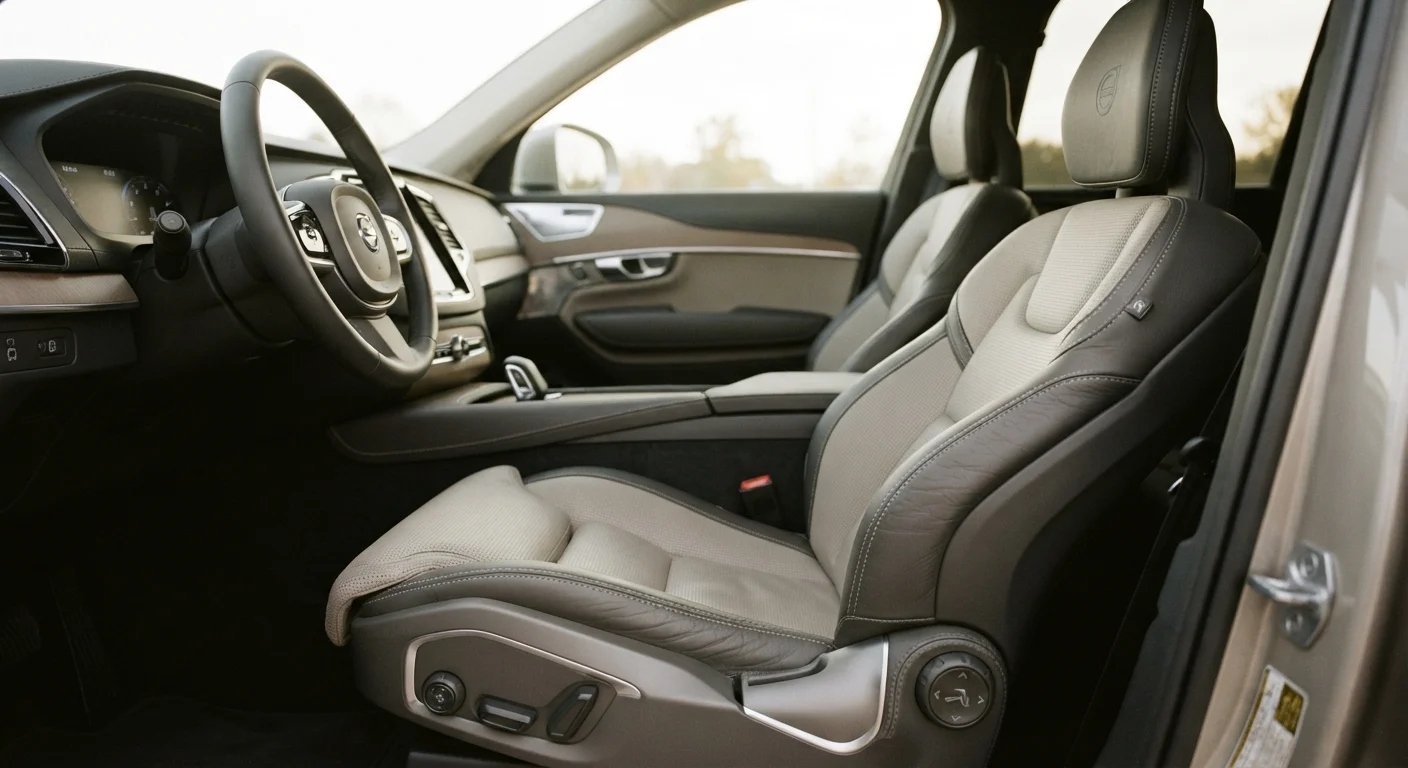
Why Seat Ergonomics Matter More as You Age
The driver's seat is your primary interface with any vehicle — yet the terminology printed in brochures or mentioned by sales staff often goes unexplained. For older drivers, this matters practically: poor seat ergonomics can contribute to back pain, fatigue, joint stiffness, and reduced control over long drives. Understanding what each term actually describes gives you the tools to evaluate any seat on its own merits.
Ergonomic design in car seats is about more than comfort. It concerns spinal alignment, pressure distribution, ease of entry and exit, and the reduction of cumulative physical strain. The good news is that most of these features are adjustable — once you know what to look for. See our complete overview of comfort and easy access features for a broader picture of how seat design fits into overall vehicle ergonomics.
| Primary ergonomic risk for drivers | Lower back strain from inadequate lumbar support (General biomechanics consensus) |
| Ideal knee-to-seat-edge clearance | 2–3 finger-widths (Occupational seating ergonomics guidelines) |
| Seat adjustment axes in basic vehicles | 2 (fore-aft and recline) (Standard automotive specification categories) |
| Seat adjustment axes in well-equipped vehicles | Up to 10 or more (Includes height, tilt, lumbar, headrest, and bolster) |
| Minimum sit-time to assess seat fit | 5 minutes in driving position (General ergonomic evaluation practice) |
Key Ergonomic Terms Defined
The glossary below covers the terms you are most likely to encounter when reading seat specifications or testing a vehicle in person. Each one affects a specific aspect of posture or physical support.
Lumbar Support
A built-in or adjustable feature that pushes the lower back of the seat forward, supporting the inward curve of the lumbar spine. Without it, extended sitting causes the lower back to round, creating strain. Adjustable lumbar lets you fine-tune the depth and position of this support.
Bolstering
The raised side sections of the seat back and cushion that hold the occupant in position. Heavy bolstering (common in performance seats) can be uncomfortable or restricting for those with wider builds or reduced hip flexibility. Moderate bolstering provides lateral support without constriction.
Cushion Length (Thigh Support)
The front-to-back depth of the seat cushion. A cushion that is too short leaves the thighs unsupported, increasing pressure at the back of the knees. One that is too long presses into the back of the knee. Ideal cushion length leaves two to three finger-widths between the seat edge and the back of your knee.
Seat Rake
The angle of the seat back relative to vertical. A more reclined rake reduces spinal compression but can make it harder to see over the dash. A more upright rake improves sightlines but may increase pressure on the lower back if lumbar support is inadequate.
Headrest Position
The adjustable component at the top of the seat back, primarily designed for whiplash protection in rear-end collisions. For everyday driving, the headrest top should align with the top of the head and sit close enough to contact the head in a relaxed, neutral posture.
Seat Height
The distance from the vehicle floor or ground to the top of the seat cushion. A higher seat position makes entry and exit easier and improves forward visibility. Lower seats require more effort to get in and out of and suit drivers with good hip and knee mobility.
Pressure Distribution
How evenly a seat cushion spreads the occupant's body weight across the sitting surface. Seats with poor pressure distribution create concentrated load points — typically under the sitting bones — that cause discomfort or numbness on longer journeys.
Armrest Height
The vertical position of the center console or door-mounted armrest relative to a seated driver's elbow. An armrest set too high raises the shoulder; too low causes the arm to hang unsupported. Correct height allows the elbow to rest with the shoulder relaxed and level.
When evaluating a seat in person, sit in the driving position for at least five minutes. Adjust one feature at a time and notice whether your spine feels supported without pressure points, whether your knees sit slightly below your hips, and whether your shoulders are relaxed rather than raised. These are signs of genuine ergonomic fit — not just a comfortable first impression.
Adjustability: What to Actually Test
A seat with many ergonomic features is only useful if those features are accessible and intuitive to operate. For older drivers, adjustment controls that require significant grip strength or visual hunting are themselves a design shortcoming.
- Power vs. manual adjustment: Power-adjustable seats use buttons or switches to move the seat forward, back, up, and down. Manual adjustment uses a lever or handle. Power adjustment is generally easier for those with limited hand strength or dexterity.
- Number of adjustment axes: Basic seats adjust fore-aft and sometimes recline. More adjustable seats include height, cushion tilt, lumbar inflation, and headrest height. More axes mean a more precise fit for your body.
- Memory function: Some seats store preferred positions at the touch of a button — useful if a vehicle is shared between drivers of different heights.
- Heating and ventilation: Heated seats can relax muscle tension during cold starts. Ventilated seats reduce moisture buildup on longer journeys. Both contribute to sustained comfort rather than just initial feel.
Evaluating comfort and access features when shopping offers a structured checklist approach to testing these elements at the dealership.
When to Consult an Occupational Therapist
If you have a diagnosed spinal condition, recent joint replacement, or chronic pain that makes driving uncomfortable, a certified driver rehabilitation specialist (CDRS) can assess your seating needs in clinical detail. These professionals evaluate both vehicle fit and adaptive equipment options. The Association for Driver Rehabilitation Specialists (ADED) maintains a directory of certified specialists in the United States.
Seat Cushions and Entry: The Overlooked Connection
Seat ergonomics does not begin once you are seated — it begins the moment you open the door. Cushion height, bolster firmness, and seat edge design all influence how difficult or easy it is to get in and out of a vehicle. A deeply bolstered sports-style seat can be an obstacle for anyone with limited hip flexibility.
If you find a vehicle's stock seat challenging for entry or exit, aftermarket cushion aids are worth exploring. Our article on swivel seat cushions vs. standard seat cushions explains how rotating cushions can ease transfers for older drivers. Separately, seat height and getting in without the struggle explores how the distance from ground to seat affects daily usability in concrete terms.
No single ergonomic feature guarantees comfort for every driver. Body proportions, existing conditions, and personal preferences all shape how a seat performs for a specific individual. The goal is to approach any vehicle evaluation with clear criteria — and these definitions give you a practical starting point.
The content on this site is for informational purposes only and is not a substitute for professional advice. Always consult a qualified professional for guidance specific to your situation.